 GlySteady
About This App
A personal IoT dashboard for tracking diabetic supply device usage and blood glucose levels.
What Is GlySteady?
GlySteady is a cloud-connected monitoring application designed to help individuals managing diabetes keep track of their daily device usage and blood glucose readings. It connects to a physical kit of four common diabetic supply devices via a small ESP32 IoT module, and provides a real-time web dashboard for the user and their caregivers.
The four devices tracked are:
Each time a device is used, the IoT module logs a timestamped event. These events are stored securely in the cloud and displayed on a private dashboard accessible to authorised users only.
Who Uses It?
This is a personal hobby project used by a small, known group of individuals — primarily the patient themselves and any caregivers or family members they choose to invite. There is no public sign-up. New accounts are created by invitation only, by the application administrator.
Why SMS Messages Are Sent
SMS is used exclusively to deliver health and safety alert notifications to authorised users who have explicitly opted in. No marketing, promotional, or unsolicited messages are ever sent.
The following alert types may trigger an SMS message:
Each alert has a configurable cooldown period to prevent repeated messages for the same condition. Users control exactly which alerts they receive and on which channels (email or SMS).
Sample SMS Messages
The following are representative examples of the SMS messages users may receive:
How Users Opt In to SMS
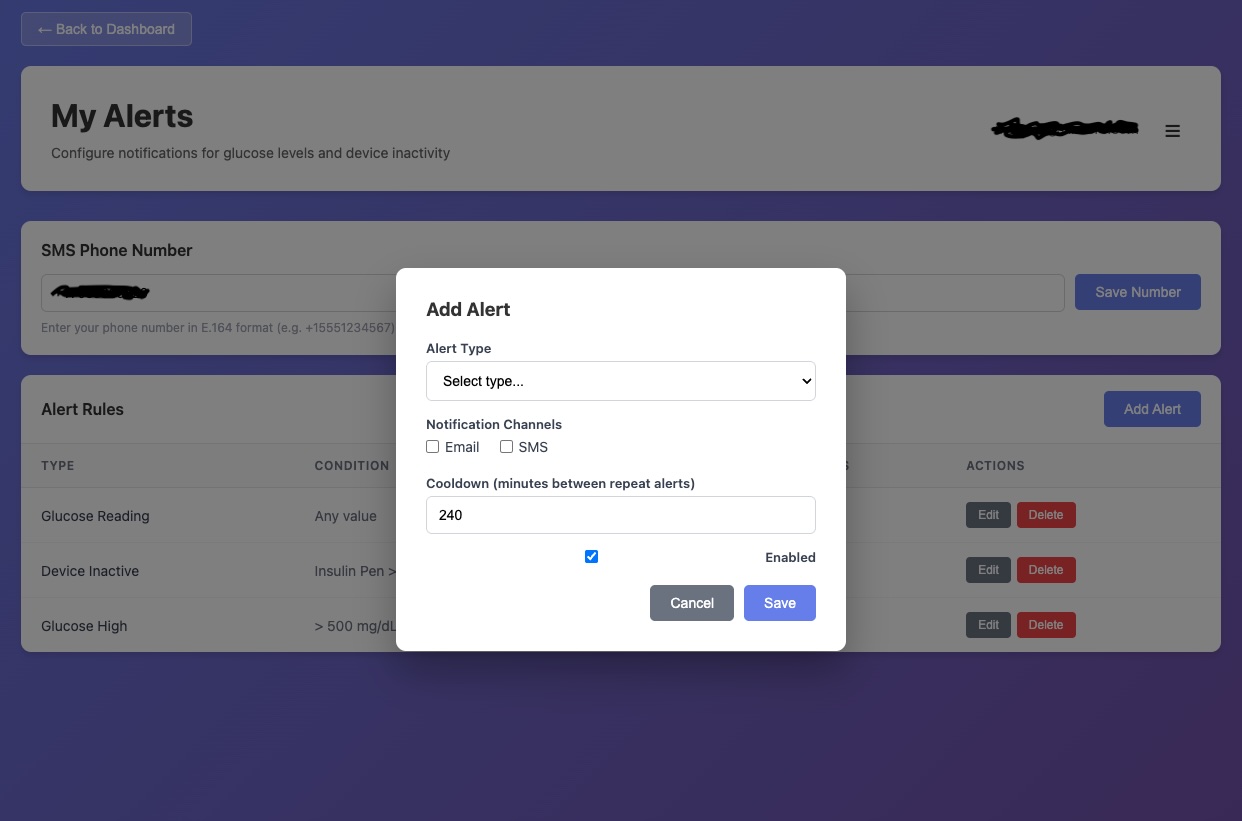
SMS messages are only sent to users who have explicitly opted in through the following steps:
- The user is invited to the application by the administrator and creates an account.
- The user navigates to their profile settings in the dashboard and voluntarily enters their mobile phone number.
- The user must manually select (by checking an unchecked box) SMS as a notification channel for each alert type they wish to receive. No pre-checked boxes are used — users must actively choose to enable SMS.
- SMS messages are sent only to the phone number on file, only for the alert types the user has enabled.
Users can opt out at any time by replying STOP to any SMS message, by removing their phone number from their profile, or by disabling SMS on their alert configurations.
Message Frequency
Message frequency varies depending on the alert rules each user configures and actual device usage and glucose readings. Users control their own alert thresholds and cooldown periods. Standard message and data rates may apply.
Contact
GlySteady is operated by Jeff Gallimore as a sole proprietorship.
For questions about this application or to request account access, please contact support@glysteady.com.
Address: 17913 Skip Away Ct, Leesburg, VA 20175